

Featured Image
Introduction:
👉 Easily convert special characters with our free HTML Entities Encoder—perfect for clean, secure, and browser-safe HTML code display. This online encoding tool ensures secure text rendering and simplifies your workflow. With this encoder, you can convert special characters into HTML entities without any extra tools.
Table of Content
- Why Special Characters Break Web Pages
- The Role of Encoding and Decoding Tools
- Avoid Code Breaks and Security Risks
- Clean Display of User-Generated Content
- Restore Readability with Decoding
- Get More Done with One-Click Tools
- Protect Against Injection and XSS Attacks
- Handle Unicode and Multilingual Content
- Stop Manual Encoding – Use Online Tools
- HTML Escape and Unescape Simplified
- The Essential Tool for Web Professionals
- Choose the Right Tool for Effortless Encoding
Email Subscription Form
Body:
👉 Read the following article to learn about HTML Entities Encoder in textual format. Use this one-click encoder tool for HTML entities to see real-time results. It’s a free HTML encoding tool online for web developers.
A How to Use This ‘HTML Entities Encoder‘ tool ?
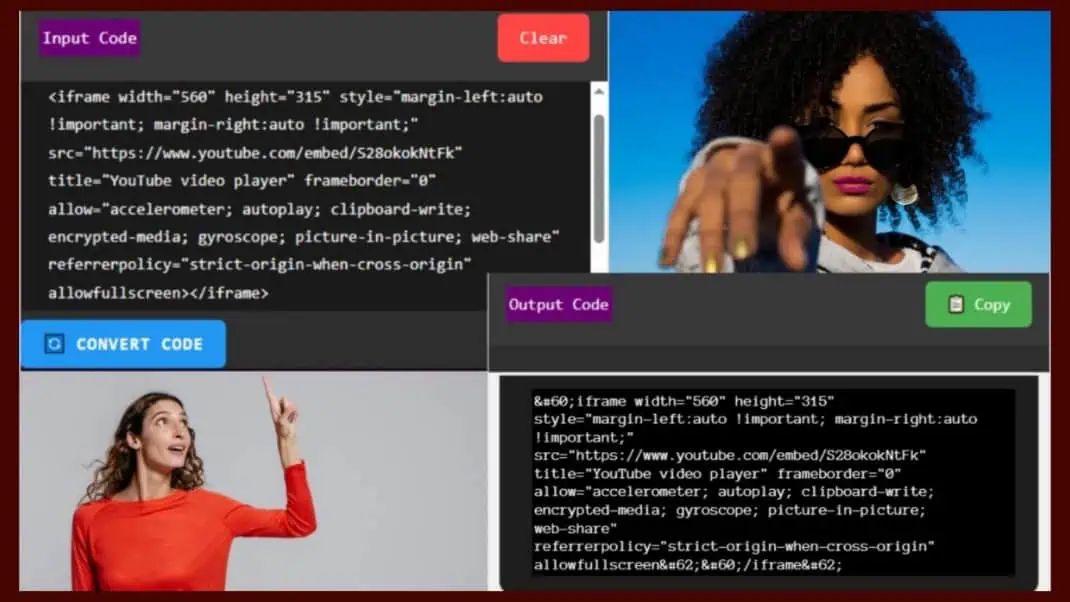
Step 1: Copy the code below, paste it into the ‘Input Code’ section above, and hit ‘Convert Code’. This step uses the HTML Character Encoder tool to handle special characters automatically. The Online Entities Encoder feature processes your text instantly.
<iframe width="560" height="315" style="margin-left:auto !important; margin-right:auto !important;" src="https://www.youtube.com/embed/S28okokNtFk" title="YouTube video player" frameborder="0" allow="accelerometer; autoplay; clipboard-write; encrypted-media; gyroscope; picture-in-picture; web-share" referrerpolicy="strict-origin-when-cross-origin" allowfullscreen></iframe>
Step 2: The converted code will appear in the “Output Code” section below and look like this within the “code” tag. Use the HTML Entities Encoder tool online to generate and verify your output. This Online Character Encoding tool ensures accuracy and safety.
<iframe width="560" height="315" style="margin-left:auto !important; margin-right:auto !important;" src="https://www.youtube.com/embed/S28okokNtFk" title="YouTube video player" frameborder="0" allow="accelerometer; autoplay; clipboard-write; encrypted-media; gyroscope; picture-in-picture; web-share" referrerpolicy="strict-origin-when-cross-origin" allowfullscreen></iframe>
Now copy the entire converted code from Step 2, including the “code” tags, and enclose it within a “pre” tag for embedding on your webpage. After embedding, preview the results for safe display of encoded HTML characters. This free HTML Entities Encoder simplifies the process and keeps your content secure.
#. See whole code below with ‘pre’ tag.
<pre>
<code><iframe width="560" height="315" style="margin-left:auto !important; margin-right:auto !important;" src="https://www.youtube.com/embed/S28okokNtFk" title="YouTube video player" frameborder="0" allow="accelerometer; autoplay; clipboard-write; encrypted-media; gyroscope; picture-in-picture; web-share" referrerpolicy="strict-origin-when-cross-origin" allowfullscreen></iframe></code>
</pre>
#. NOTE on HTML Entities Encoder tool:
This HTML Entities Encoder tool is useful for displaying code, such as iframes, on a webpage so that it’s visible to users—similar to how YouTube provides embed code for copying. Our Secure text display HTML tool which protects your site from injection risks. This Convert HTML Entities Online utility enhances readability for all audiences.
Next time you need to display such code, simply visit the InfoTrim website and access this tool from the “Sitemap” or “Tools” section in the header menu. Explore our “Encode Quotes and Symbols for HTML” section to learn more practical tips and best practices. Quickly find this HTML escape tool in the header menu and start encoding your content instantly.
#. NOTE: This page features a tool to convert symbols into HTML entities for quick and easy use. Remember to encode your content properly before publishing. Use the best free HTML entities encoder from InfoTrim for optimal results.
Next time, search for “HTML Entities InfoTrim” on Google to quickly find this post. For easier access, bookmark this entity conversion tool for web developers. Enjoy hassle-free HTML entity encoding with this tool.
B Benefits of Using this ‘HTML Entities Encoder‘ tool
1. Why Special Characters Break Web Pages
When you’re working with web development, displaying special characters correctly is essential. Misinterpreted symbols like <, >, or & can break your HTML layout. That’s where an HTML Entities Encoder becomes a must-have tool to prevent broken tags and maintain clean code structure.
2. The Role of HTML Encoding Tools
The primary role of an HTML Entities Encoder is to convert special characters into HTML entities. This helps maintain the structural integrity of your website code while ensuring accurate display of content. Whether you’re a beginner or an advanced coder, using an online character encoding tool simplifies the process.
3. Avoid Code Breaks and Security Risks
Modern web editors often don’t automatically handle entity encoding, which can lead to broken tags or vulnerable input fields. A dedicated HTML Entities Encoder tool ensures your code is clean, readable, and secure. It’s also a great way to HTML escape characters like quotes, ampersands, and angle brackets.
4. Clean Display of User-Generated Content
If you’re designing a user-facing interface or handling user-generated content, encoding is crucial. Tools like the HTML Entities Encoder allow you to convert symbols to HTML entities without any hassle. This improves compatibility across browsers and platforms.
5. Handle Unicode and Multilingual Content
Let’s not forget about Unicode and multilingual content. A Unicode to HTML entity converter ensures even non-English symbols are rendered safely and correctly. This is especially important when building global applications or blogs.
6. Stop Manual Encoding – Use Online Tools
If you’re still encoding manually, it’s time to upgrade. A free HTML Entities Encoder tool online can save you time and effort. Plus, it’s a safer and more scalable solution for large websites.
7. HTML Escape Simplified
Whether you need to encode special characters in HTML, a single tool can handle it efficiently. The HTML escape tool online is perfect for turning complex text into clean, copy-safe outputs for CMS platforms and web applications.
8. The Essential Tool for Web Professionals
In brief, using an HTML Entities Encoder tool is more than a convenience—it’s a necessity. From improving user experience to enhancing code safety and accessibility, this tool empowers developers and content creators alike.
9. Choose the Right Tool for Effortless Encoding
Finally, explore the best HTML Entities Encoder tool with user-friendly features and real-time processing. The right tool can help you safely encode special HTML characters without writing a single line of code and streamline your development workflow.
10. HTML Escape and Unescape Simplified
If you need to encode special characters in HTML, a single tool can handle the process efficiently. The HTML escape tool online is perfect for turning complex code into clean, copy-safe outputs. It’s ideal for CMS platforms, email templates, and dynamic content rendering.
11. The Essential Tool for Web Professionals
More precisely, using an HTML Entities Encoder tool is not just convenient—it’s essential. From improving user experience to enhancing security and accessibility, this tool empowers developers and content creators alike. Make sure to bookmark your favorite entity conversion tool for web developers today.
12. Choose the Right Tool for Effortless Encoding
Finally, if you’re on the lookout for the best free HTML Entities Encoder tool, then explore options with user-friendly interfaces, batch processing, and real-time previews. The right tool can help you safely encode special HTML characters without writing a single line of code. So, elevate your development workflow now with a reliable HTML Entities Encoder.
Conclusion:
👉 Using an HTML Entities Encoder is one of the smartest ways to ensure your web content is displayed exactly as intended. Whether you’re building a personal blog, a business website, or a full-fledged app, character encoding plays a vital role in keeping your layout, readability, and functionality intact. Using the HTML Entities Encoder tool removes the guesswork and reduces the risk of broken HTML or unintended behavior.
Moreover, it adds an essential layer of security by preventing common injection flaws and safely encoding user inputs. If you frequently handle user-generated content or embed code snippets, this tool becomes indispensable. By using a trusted online HTML encoding tool, you future-proof your content for all types of browsers and devices.
In an age where speed, safety, and accessibility matter more than ever, having a one-click HTML Entities Encoder in your toolkit is a game changer. It streamlines your workflow, ensures consistent formatting, and helps maintain professional coding standards. So the next time you need to encode HTML characters for display or security, this tool has your back.
Additional info of This Post HTML Entities Encoder
- Total Words: 1767
- Time to Read: 9 Min
- Category: Html Entities
- Webpage Type: Web Application
- Author: InfoTrim
Required Time to Use This Tool HTML Entities Encoder
- Time to Use: When Needed.
- Who Should Use it?: Everyone who need this.
- How it Helps?: Explore and Feel it.
- Will it be Free?: Free Forever.
- Does the page refresh clear the text?: No, until it’s not removed or cleared.
Explore Other Tools :
FAQ
1. How does an HTML Entities Encoder tool work?
Developers often need a safe way to display special symbols and reserved characters in web pages without breaking the code. An HTML Entities Encoder tool converts text into HTML escape characters or HTML entities, ensuring browsers render symbols correctly and preventing formatting issues. By using HTML character encoding or an HTML entity converter, developers maintain clean code and improve web compatibility.
2. How can you Convert HTML Entities Online easily?
Web developers often need a simple way to display special symbols and reserved characters without breaking webpage code. Tools that Convert HTML Entities Online help transform text into HTML escape characters using an HTML entity converter, ensuring proper HTML character encoding across browsers. This process keeps markup safe, improves compatibility, and prevents formatting errors in web development.
3. What is an Online Character Encoding Tool?
Web developers often need a reliable way to display special symbols without breaking webpage markup or browser compatibility. An Online Character Encoding Tool converts text into HTML escape characters or encoded symbols using proper HTML character encoding and an HTML entity converter. This process ensures safe rendering, prevents formatting issues, and improves cross-browser web compatibility.
4. How does an Online tool to encode HTML characters work?
Special symbols in text can sometimes break webpage code or display incorrectly in browsers. An Online tool to encode HTML characters converts normal text into HTML entities using proper HTML character encoding and HTML escape characters. This helps developers safely display symbols on web pages while improving compatibility, security, and code readability.
5. How do Web developer tools for HTML encoding work?
Handling special symbols correctly is essential when building secure and compatible webpages. Web developer tools for HTML encoding convert normal text into safe HTML entities using HTML character encoding, HTML entity encoder logic, and proper HTML escape characters. This ensures browsers render symbols correctly while preventing formatting issues and improving code reliability.
Remember to share this post on your preferred social media platform with your family, friends, relatives, community, peers, and admirers.